- aws lambda
- gpu
- lambda managed instances
- ai agents
- step functions
Migrate GPU Podcast rendering from EC2 to Serverless on Lambda Managed Instances (LMI) with 90 min async runs
Our video podcast renders on a GPU once a week, and an AI agent runs it. What it took to move that to Lambda Managed Instances, cut the render from 5 hours to about 1, and keep the agent away from the GPU bill.

On this page
Every week an AI agent renders our video podcast. An episode is 384 lip-synced video clips, and each clip needs a GPU. We moved that job to Lambda Managed Instances (LMI), the Lambda capacity type that gained GPU support in November.
The first version ran on an NVIDIA L4 and held the GPU for about 5.2 hours, roughly $4.60 an episode. After a day of measuring and tuning, the same episode projects to about 1.1 hours and $2.20. This post covers how the pipeline is built, what surprised us, and how we stopped the agent from starting the GPU on its own.
Watch: Video Podcast Generator Demo on YouTube
- 5.2hGPU time per episode, first version
- ~1.1hprojected now
- 30s → 9.9 sper clip, g5 to tuned g6e
How it fits together
LMI runs your function on EC2 instances in your own account, so it needs a network. You give the capacity provider a VPC: subnets and a security group. For cost optimization when experimenting, you can run in public subnets with no NAT gateway: just an internet gateway and a security group that allows outbound traffic only. The instance pulls its image from ECR and the model files from S3 over its public address.
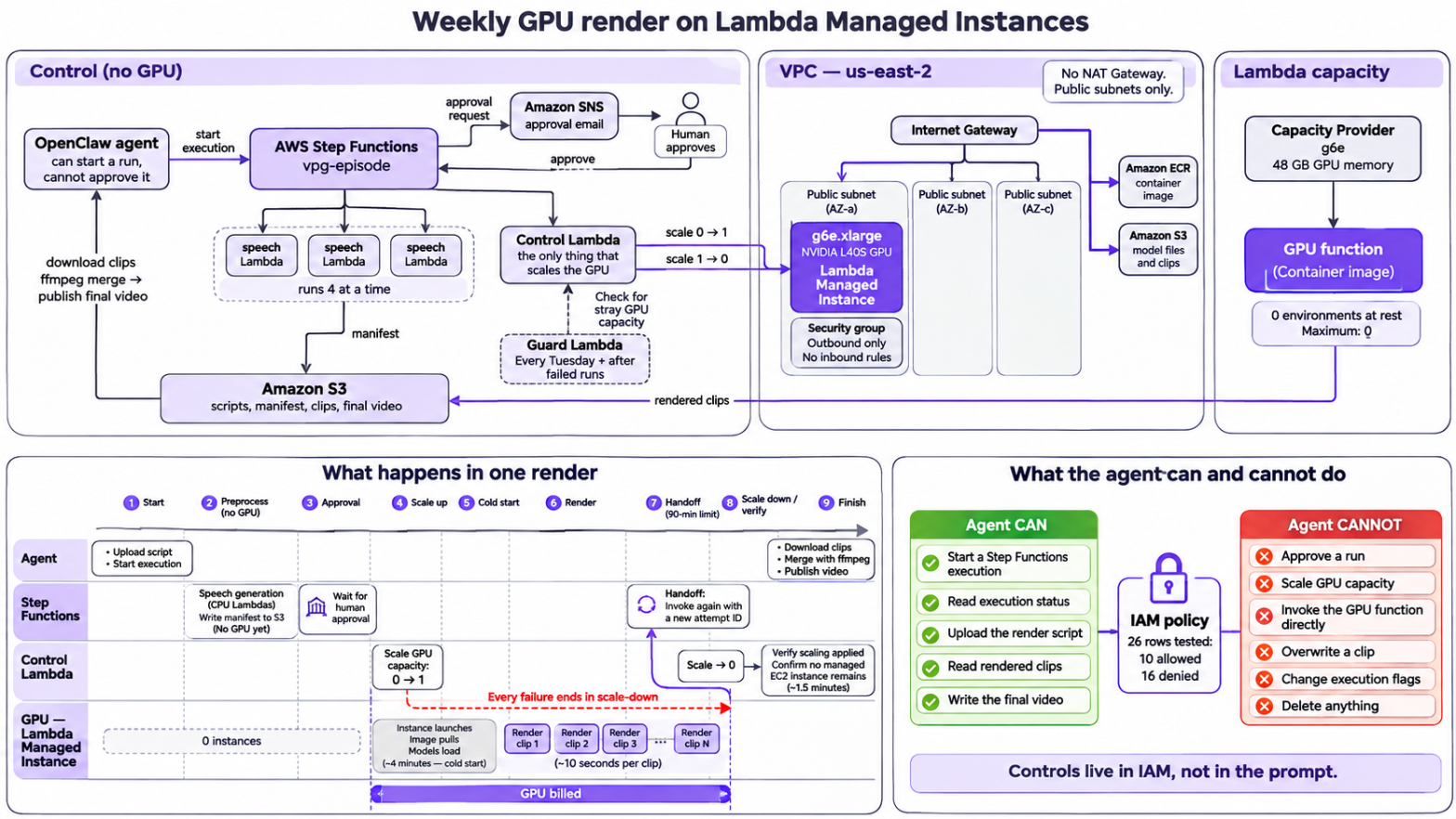
The GPU function sits at zero environments between runs. A Step Functions state machine does everything in order:
- The agent (OpenClaw) uploads the script and starts the execution.
- Speech is generated on CPU Lambdas and written to S3 with a manifest that lists every clip.
- The state machine stops and waits for a human to approve. The agent can’t answer this step.
- A control Lambda scales the GPU function from zero to one.
- The GPU function renders clips one by one into S3, and the state machine re-invokes it each time it hits the 90-minute async limit.
- The control Lambda scales back to zero and checks that the instance is really gone.
- The agent downloads the clips, merges them with ffmpeg and publishes.
Anything that fails after step 4 still goes through step 6.
Creating function with Zero Capacity is not free
We expected a function at 0/0 to cost nothing. It took four surprises to learn otherwise.
By default, creating a GPU function starts an instance. PublishToLatestPublished defaults to true, so creating the function published a version and a g5.xlarge started. Publishing version 1 with a 0/0 scaling config started a g6.xlarge too, because the scaling config only applies once the version is active. Together that was 11 to 17 minutes of instance time. We now explicitly set this to false as a best practice:
// Best practice: set to false to prevent GPU launch on creation
publishToLatestPublished: false,
describe-instances can’t see the GPU by default. Lambda Managed Instances run in Lambda’s control plane, not directly in your EC2 account, so a plain describe-instances call won’t show them. A plain call returned our CPU host and nothing else while a g5 was running. You need to explicitly include managed resources:
ec2.describe_instances(
    IncludeManagedResources=True,  # Required to see Lambda-managed instances
    Filters=[{"Name": "instance-state-name", "Values": ["pending", "running"]}],
)
applied=0 is not “stopped”. The scaling API reported zero 81 to 88 seconds before the instance was gone, and once it took six minutes to go from terminating to terminated. Our check now needs two things: applied scaling is zero and EC2 shows no managed instance.
Scale to zero and 0/0 are different. With a minimum of 0 and a maximum above 0, an invoke wakes the function. With both at 0 the version is deactivated and an invoke doesn’t wake it. We rest at 0/0, so only the control Lambda, after a human approves, can start a GPU.
Keep the CPU work off the GPU
Initially, we generated speech inside the GPU invocation. When retries failed, the GPU sat idle while waiting. Now CPU Lambdas generate speech in parallel (four at a time), write a manifest to S3, and the GPU function reads from that frozen manifest, keeping the GPU busy only on rendering.
For 90-minute runs, each invocation carries a unique attempt ID. The function writes this ID into its completion marker, and the state machine ignores markers from other attempts. This prevents the orchestrator from confusing handoffs with actual completion.
What made it cheaper
We timed the same 30-second job on every GPU type we could get. The instance type mattered far more than any cold-start trick.
| Instance | GPU | Seconds per clip on LMI | Episode, GPU time and cost |
|---|---|---|---|
| g6.xlarge | L4 | 38 | 4.0 h, $3.58 |
| g5.xlarge | A10G | 30 | 3.2 h, $3.53 |
| g6e.xlarge | L40S | 13.0 | 1.4 h, $2.83 |
| g6e, tuned | L40S | 9.9 | 1.1 h, $2.16 |
Rates are on-demand list prices plus the 9.75% LMI fee, and the episode figures are the per-clip time scaled to 384 clips, so they leave out cold start and handoffs.
The L40S costs more per hour but finishes in a third of the time. The L4 was slow partly because it ran at a 72 watt power limit and its clock dropped from 2,040 to about 1,300 MHz.
Lambda picks the newest generation in your list that has the smallest GPU meeting AcceleratorMemorySize. Ask for 24 GB and it never reaches g6e. We ask for 48 GB, which also gives up the g6 and g5 fallbacks, and capacity providers can’t be edited, so this is a new provider. Best practice: configure multiple fallback instance types in your capacity provider to handle InsufficientInstanceCapacity errors, as availability varies by zone and time.
The tuning that paid off was in the model. A clip is five denoising steps, and each step runs a second guidance pass. Skipping that pass on the last four steps took the clip from 13.0 s to 9.9 s. We rendered six clips at every setting with the same audio, image and seeds, and compared them to the baseline:
| Second pass skipped on | Time saved | PSNR vs baseline | SSIM |
|---|---|---|---|
| last 1 step | 5.9% | 40.6 dB | 0.980 |
| last 2 steps | 11.8% | 37.9 dB | 0.974 |
| last 4 steps | 23.8% | 33.1 dB | 0.949 |
None of these is bit-identical to the baseline, so “no visible difference” is a judgement, and it was ours: we watched the videos side by side and shipped the fastest setting. It is one environment variable that fails the function at startup on any value we didn’t review.
What didn’t help. Cold start optimizations saved cents, not dollars. Init-time model loading plus bf16 CLIP weights saved ~30s. SOCI lazy loading reduced time-to-active by ~20s but not time-to-first-clip. The AWS Common Runtime (CRT) gave no speed-up; downloads are disk-bound, not S3-bound. PyTorch’s S3 connector streams into memory and saved ~14s per episode. Combined savings: under $0.10 per episode.
Keeping the agent off the GPU
An OpenClaw cron job starts the weekly podcast with a prompt like “Render this week’s episode.” But a prompt that says “don’t start the GPU” is just a suggestion. We wanted the agent unable to spend on GPU.
The agent’s IAM policy allows starting Step Functions executions, reading status, uploading scripts, reading rendered clips, and writing the final video. It denies approving runs, scaling the GPU function, invoking the GPU Lambda directly, and overwriting clips.
Sample policy structure:
{
  "Version": "2012-10-17",
  "Statement": [
    {
      "Effect": "Allow",
      "Action": ["states:StartExecution", "states:DescribeExecution"],
      "Resource": "<state-machine-arn>"
    },
    {
      "Effect": "Allow",
      "Action": ["s3:GetObject", "s3:PutObject"],
      "Resource": [
        "<bucket-arn>/podcast/scripts/*",
        "<bucket-arn>/podcast/episodes/*/final.mp4"
      ]
    },
    {
      "Effect": "Deny",
      "Action": ["lambda:InvokeFunction", "lambda:PutFunctionScaling*"],
      "Resource": "*"
    }
  ]
}
Two IAM lessons:
- Dry-run as admin proves nothing. Admin is never denied. Use
iam:SimulateCustomPolicyto test against the actual policy. - Test policies on the role, not in isolation. An explicit deny (like a guardrail) beats any allow. Simulate with the role’s full policy set before attaching.
A guard Lambda checks for stray GPU capacity during podcast generation and after any failed execution, ensuring no instance runs unintended.
Deploying a GPU function with CloudFormation
Three things bit us here.
- CloudFormation waits for the GPU you are trying to turn off. A GPU version only becomes active by getting an instance, and CloudFormation waits for that. Our safety watcher set the version to zero meanwhile, so two deploys failed with “did not stabilize” and rolled back. The version resource already asks for zero, and the instance ends within about two minutes of going active, so deploys need a watcher that only observes.
- A stale reference can wedge the stack. After we moved the function to a new capacity provider,
$LATEST.PUBLISHEDstill pointed at the old one, and the stack sat in “cleanup in progress” for three hours. The only exit was deleting the function. - A fixed function name can’t be replaced. CloudFormation creates the replacement before deleting the old resource, so recreating the function under the same name failed. It has a new name now.
Pin base images by digest. A newer transformers version broke our model code. We now pin the digest and smoke-test before push.
Test it with 30 seconds first
Before trusting a full run, we render a 30-second script through the real client, state machine, GPU function and merge. It is 12 clips and costs about 8 minutes of a g6e, roughly $0.30. The check is six assertions: the clip count matches the manifest and the completion marker, video and audio lengths match the audio, they end within half a second of each other, there is one h264 and one aac stream, every frame is kept, and the GPU is back at zero. It passed on the final configuration.
A render has a fixed cost of about nine minutes of instance time, five from launch to the first clip and four from the last clip to the instance being gone. In the mock that is most of the bill. In a full episode it is under 5%.
Results
Moving from EC2 to Lambda Managed Instances cut our weekly podcast render from 5.2 hours to 1.1 hours: a 79% reduction in GPU time. Cost dropped from ~$4.60 to ~$2.16 per episode, and we gained serverless scaling with zero infrastructure to manage. The g6e L40S delivers clips in 9.9 seconds each, compared to 30 seconds on our original g5 setup.
The IAM-enforced agent boundary ensures the AI can orchestrate the pipeline but cannot directly spend on GPU. Human approval remains the gate.
Try it yourself: Our Video Podcast Generator on AWS Marketplace currently runs on GPU containers. We’re updating it to use Lambda Managed Instances soon, so you can deploy the same serverless GPU pipeline in your own AWS account.